Posts

SOLID Principles

Image
In Object-Oriented Programming (OOP) Concept, SOLID principles are the acronym for five Object-Oriented Design (OOD) principles. These SOLID principles are used to improve the understand-ability, flexibility and maintainability of the code.   S.O.L.I.D. Stands For? 1.      S - Single-responsibility principle 2.      O - Open-closed principle 3.      L - Liskov substitution principle 4.      I - Interface segregation principle 5.      D - Dependency Inversion Principle   Let’s see what is the exact meaning of each principle using an example. Ex: There is an online store. A registered customer can place an order and purchase them using the card or make payment when delivering the order. Let’s move to the principles again.   1.      Single-Responsibility Principle The common definition of this principle is “A class should have o...

MongoDB Community Server

Image
MongoDB  is a cross-platform, document-oriented, and   NoSQL database program. Since there is no pre structure table, it is easy to change the scale of the database.  You can easily download MongoDB Community Server using this link . (Select latest .msi version) After downloading the file, you can follow the installation steps and install the MongoDB Compass to your machine. Let's see how to do crud operations using MongoDB Compass. 1. Double click and open the MongoDB Compass. 2. Click "Connect" button and create new connection 3. Click "Create Database" button and create new database 4. Click "Create Database" button 5. Go to the Database and Select the Collection 6. Click "Add Data" button to insert Document 6.1. Insert Data as Objects 6.2. Insert Data using List View Other methods of insertion Output of the insertion 7. Click "Edit" button to update data 8. Edit data ...

Count Coin Values in Image using MATLAB

Image
As the first step, I am going to read the image.              img = imread('F:/Academic Video/MC/PracticalAssignment_I/Coins.jpg'); As the second step, I am going to crop the image.             img1 = img(700:2500,400:1950,:); As the third step, I am going to convert the image into black and white             bw = im2bw(img1); As the fourth step, I am going to convert the background color into black and object color into white.             bw = ~bw; As the fifth step, I am going to enhance the objects.             se = strel('disk',50);             img2 = imdilate(bw,se);             img2 = imerode(img2,se);             se = strel('disk',60);             ...

Take Snapshots Using WebCam in MATLAB

Image
In this post, I am going, open webcam capture image save the captured image  using MATLAB. As the first step, we want to install the support tool. So we have to click "Add-Ons." After that, we have to select "Get Hardware Support Packages." Next, we have to search for  MATLAB Support Package for USB Webcams  and install it. (before installing Add-Ons, you want to log in to MATLAB)  After installing the support tool, You can use these codes. captureimg.m clear; cam = webcam; %start webcam cam.Resolution = '640x360'; %resize the webcam resolution preview(cam); %preview the webcam pause(5); %pause the webcam img = snapshot(cam); %take snapshot closePreview(cam); %close the preview screen imshow(img); %show the image savecapture(img); %call function savecapture clear; %stop the webcam savecapture.m function savecapture(img)     persistent k %static value k for naming variables      if isempty(k) ...

Face Recognize – MATLAB (With Source Code)

Image
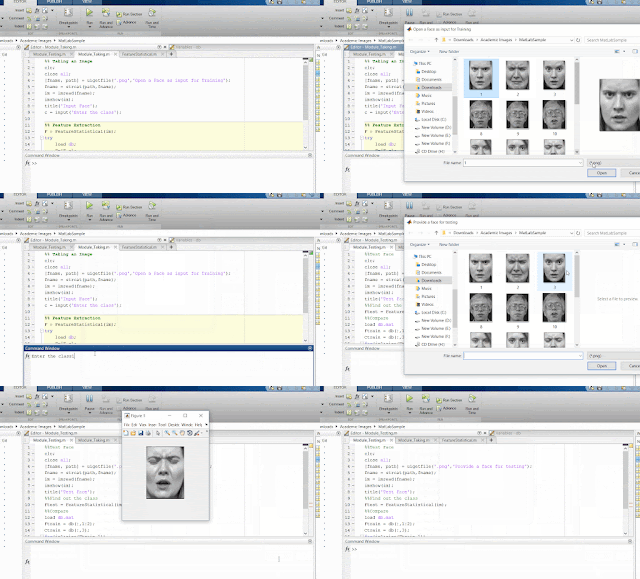
As a beginner to MATLAB, I searched a source code for studying throughout the internet. But I could not find a complete source code for that. So, this is the source code for you who searching a MATLAB code for face recognize. 1.     Read Face %%Reading Face & Class of the face clc; close all ; [fname, path] = uigetfile( '.png' , 'Open a Face as input for Training' ); fname = strcat(path,fname); im = imread(fname); imshow(im); title( 'Input Face' ); c = input( 'Enter the class' ); %%Extracting Features & Saving F = FeatureStatistical(im); try     load db ;     F=[F c];     db=[db; F];     save db.mat db catch     db = [F c];     save db.mat db end 2.     Extracting Function %%Creating FeatureStatistical.m function [F]=FeatureStatistical(im) im=double(im); m=mean(im(:)); s=std(im(:)); F=...

Add Comment Sample Project

Image
Hi everyone, Today I am going to develop simple " Add Comment " project. I use following code to show comment icon. IconButton comment = IconButton( iconSize: 35.0 , icon: Icon(Icons. chat_bubble_outline ,color: Colors. grey ), onPressed: ()=> _commentButtonPressed(), );   return ListTile( leading: comment, ) class CommentScreen extends StatefulWidget { final String postId ; const CommentScreen(document, this . postId ); @override _CommentScreenState createState() => _CommentScreenState( postId: this . postId , ); } class _CommentScreenState extends State<CommentScreen> { final String postId ; final TextEditingController _commentController = TextEditingController(); _CommentScreenState({ this . postId }); @override Widget build(BuildContext context) { return Scaffold( appBar: AppBar( title: Text( "Comments" , style: TextStyle(color: Colors. black )...

Like Button Sample Project

Image
Today I am going to build a Like button using flutter and fire-store. Actually this is not a button. It displays how to code for "Like Button" . Here I am using authenticate users and their user id. Here is the Sample Code for this project. class PublishPost extends StatefulWidget{    @override    _PublishPost createState() => new _PublishPost(); } class _PublishPost extends State<PublishPost> {   bool isPostLiked = false ;      @override      Widget _buildListItem (BuildContext context, DocumentSnapshot document) {       List<String> users;       Widget child;        if (document[ 'likedby' ].contains( '4' )) {         child = Text( 'Liked' );       } else {         child = Text( 'Like' );       }      ...