Posts

Showing posts with the label MATLAB

Count Coin Values in Image using MATLAB

Image
As the first step, I am going to read the image.              img = imread('F:/Academic Video/MC/PracticalAssignment_I/Coins.jpg'); As the second step, I am going to crop the image.             img1 = img(700:2500,400:1950,:); As the third step, I am going to convert the image into black and white             bw = im2bw(img1); As the fourth step, I am going to convert the background color into black and object color into white.             bw = ~bw; As the fifth step, I am going to enhance the objects.             se = strel('disk',50);             img2 = imdilate(bw,se);             img2 = imerode(img2,se);             se = strel('disk',60);             ...

Take Snapshots Using WebCam in MATLAB

Image
In this post, I am going, open webcam capture image save the captured image  using MATLAB. As the first step, we want to install the support tool. So we have to click "Add-Ons." After that, we have to select "Get Hardware Support Packages." Next, we have to search for  MATLAB Support Package for USB Webcams  and install it. (before installing Add-Ons, you want to log in to MATLAB)  After installing the support tool, You can use these codes. captureimg.m clear; cam = webcam; %start webcam cam.Resolution = '640x360'; %resize the webcam resolution preview(cam); %preview the webcam pause(5); %pause the webcam img = snapshot(cam); %take snapshot closePreview(cam); %close the preview screen imshow(img); %show the image savecapture(img); %call function savecapture clear; %stop the webcam savecapture.m function savecapture(img)     persistent k %static value k for naming variables      if isempty(k) ...

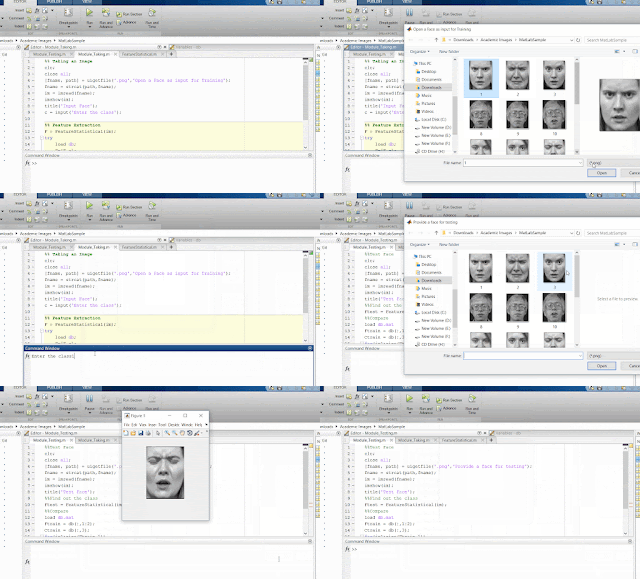
Face Recognize – MATLAB (With Source Code)

Image
As a beginner to MATLAB, I searched a source code for studying throughout the internet. But I could not find a complete source code for that. So, this is the source code for you who searching a MATLAB code for face recognize. 1.     Read Face %%Reading Face & Class of the face clc; close all ; [fname, path] = uigetfile( '.png' , 'Open a Face as input for Training' ); fname = strcat(path,fname); im = imread(fname); imshow(im); title( 'Input Face' ); c = input( 'Enter the class' ); %%Extracting Features & Saving F = FeatureStatistical(im); try     load db ;     F=[F c];     db=[db; F];     save db.mat db catch     db = [F c];     save db.mat db end 2.     Extracting Function %%Creating FeatureStatistical.m function [F]=FeatureStatistical(im) im=double(im); m=mean(im(:)); s=std(im(:)); F=...